
Enterprise preview

Turn document tables into data your business can use.

Explore a workflow that brings extraction, team review, and AI-assisted corrections together. Resolve exceptions with the source in view, then move approved tables into the systems your business uses.

Reach us at enterprise@extracttable.com

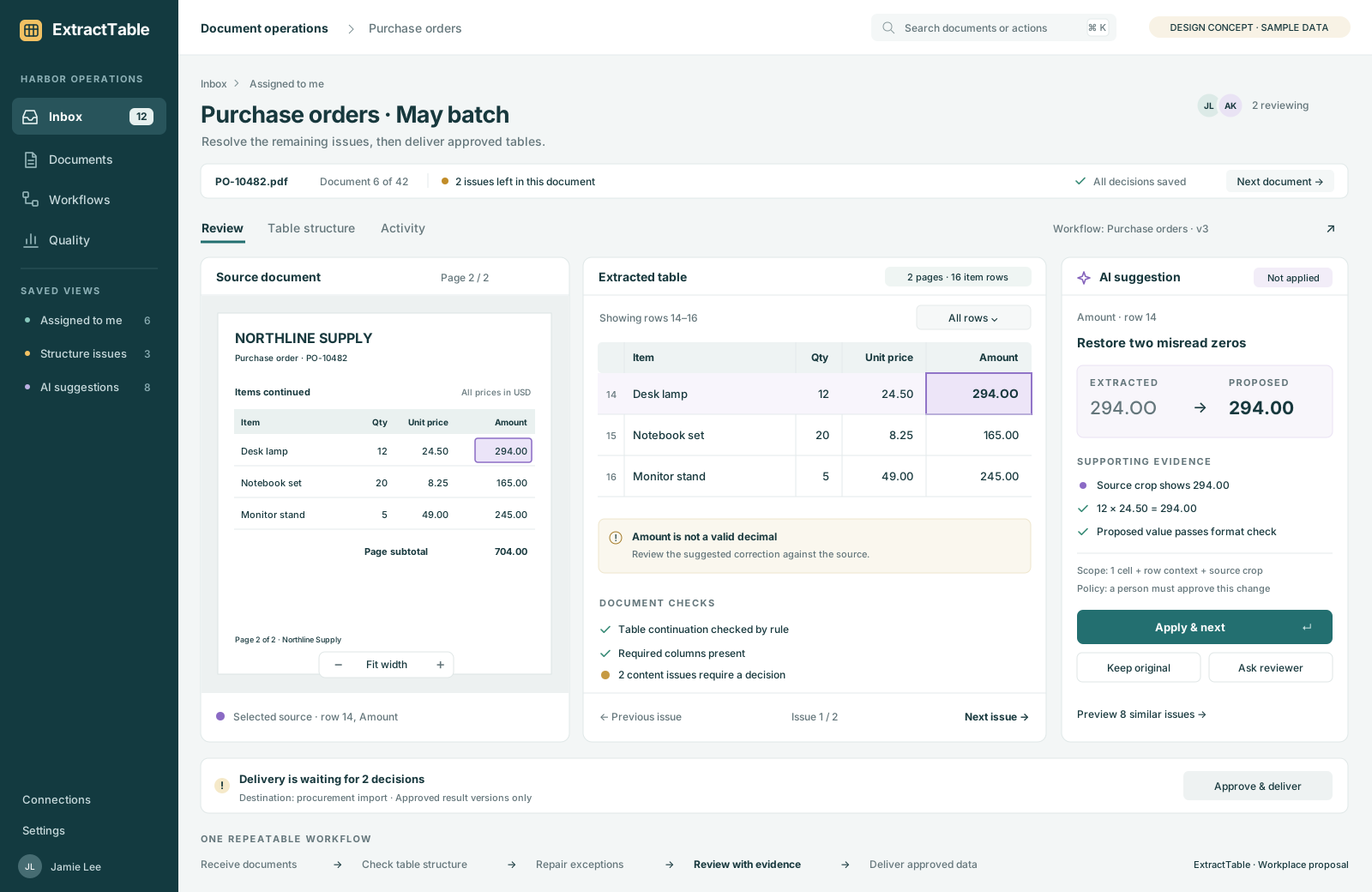
Enterprise workspace concept: an assigned document, its source table, and an unapplied correction from 294.OO to 294.00. Delivery waits for review.
Workspace concept · Illustrative dataView full size (opens in a new tab)

Built around the decisions that matter

Give your team fewer exceptions to resolve.

A complex header, a misread amount, or a table split across pages can hold up an entire batch. Our enterprise direction brings those decisions into one place, with the context to resolve them and rules your team can reuse.

01 / Team review

Review the work
that needs you.

Give reviewers clear priorities. Open an issue with the document and table aligned, make a correction, and keep a shared record of the decision.

Amount needs reviewJL
Header checkedSaved

Assigned work · Source evidence · Review history

02 / Selective AI repair

Make AI corrections
worth the cost.

Let an approved model examine the cells that need help, with the context it needs. Review proposed changes and keep usage within your team's budget.

AI suggestion · Not applied

294.OO294.00

Source value + row context

Contextual repairs · Visible changes · Usage limits

03 / Table workflows

Keep the structure.
Standardize the output.

Define the columns, units, and checks your business requires. Reconstruct tables across pages and prepare consistent results for applications and agents.

Pages 1 + 2One table

Multi-page tables · Reusable rules · Defined output

Shared review, selective AI repair, and verified delivery are planned enterprise capabilities. Contact us for current access and rollout details.

One workflow, shared context

A clear role for every team.

Operations

Keep batches moving with clear priorities, ownership, and a record of each review decision.

Data & engineering

Connect consistent columns and explicit exceptions to the applications and agents you already use.

IT & governance

Define document retention, access, provider, and delivery requirements as part of your evaluation.

Start with a real workflow

Prove it on the documents you already work with.

Evaluate table structure, correction effort, and processing cost against how your team works today.

Discuss your workflow
  1. Choose a workflow

    Representative documents, difficult examples, and the output your team needs.

  2. Evaluate the result

    Review structure, critical values, human effort, and cost together.

  3. Define the rollout

    Agree on review rules, integration requirements, and a clear scope.

Before you get started

A few practical questions.

How do we get enterprise access?

Email enterprise@extracttable.com with what your team processes, the output you need, and an approximate volume if you know it. We'll discuss the appropriate access and evaluation scope.

Is every feature shown available today?

This is an enterprise preview. Shared review, selective AI repair, and verified delivery are planned capabilities. Contact us for current access and rollout details.

Can we evaluate our own documents?

Representative and difficult examples should be part of the evaluation. Start by describing your workflow; we'll agree on the appropriate way to share sample documents.

Can we choose our model and data requirements?

Tell us your preferred provider, document retention, access, and delivery requirements. Supported connections and controls will be agreed as part of the evaluation scope.

How do we evaluate accuracy and pricing?

Agree on representative documents and the output you require. Evaluate complete table structure, critical values, review effort, and processing cost together. Pricing can then reflect your document volume and workflow requirements.

Enterprise access

Bring a difficult table.
Define a better workflow.

Tell us what your team processes and where the data needs to go.

Reach out for access

Include your use case, desired output, and approximate monthly volume.

Request enterprise access

Opens your email app. You can also copy the address above.